
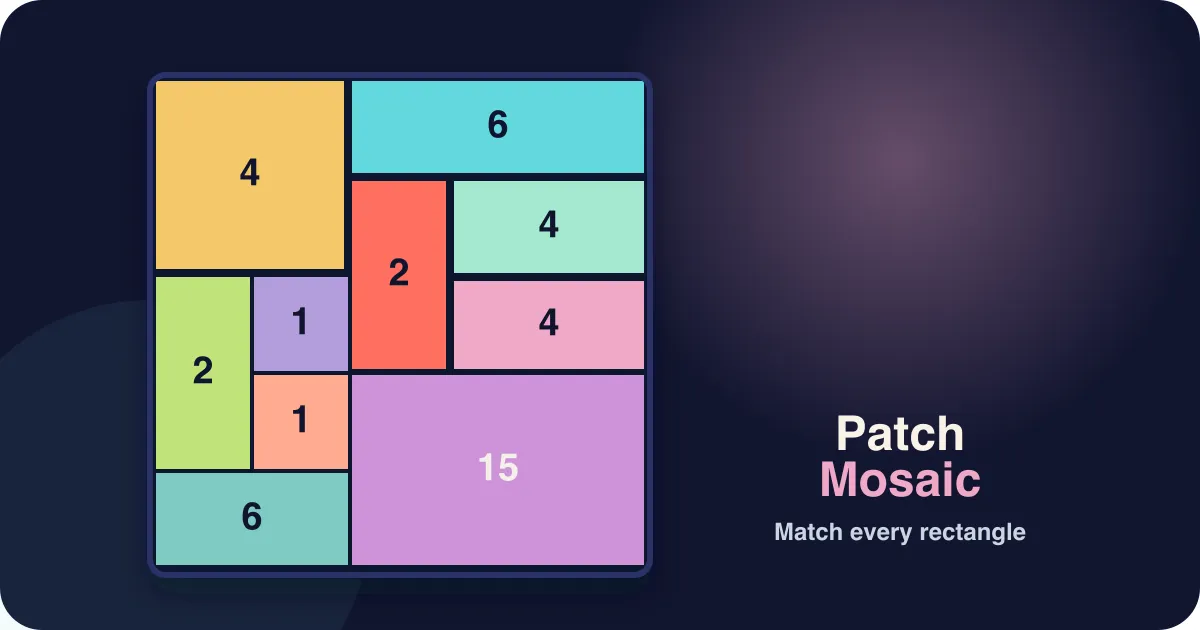







Patch Mosaic is a free online rectangle-partition puzzle you can play instantly in your browser, no download, no account, and unlimited boards any time you like. Every board is scattered with numbered clue cells, and your goal is to divide the entire grid into rectangular patches so that every patch contains exactly one clue and covers exactly as many cells as that clue's number. What turns each board from a search into a deduction is the small marker drawn in the corner of every clue: it says whether that clue's rectangle has to be a square, a tall rectangle, a wide rectangle, or — on the dashed wildcard clues — any of the three. A clue reading 6 could be 1×6, 6×1, 2×3 or 3×2 on its number alone; its marker narrows that to one or two options, and chaining those narrowings together is how a board falls. Press down on any cell and drag to another to draw a rectangular patch between them; a valid patch locks in with its own color, while dragging over a cell that already belongs to another patch or across zero or more than one clue is rejected. A patch with the right cell count but the wrong orientation is outlined in dashed amber, and one with the wrong cell count in solid red, so you can always tell which of the two rules you broke. Tap a placed patch to lift it back up, or use Undo to walk back through your last moves one at a time. Play through 100 levels across four difficulties — Easy, Medium, Hard, and Expert, 25 levels each — growing the board from a gentle 5×5 up to a demanding 12×12 while wildcard clues get rarer and nearly every clue pins its rectangle's orientation. It is a free patch mosaic puzzle unlimited, generated fresh for every level with no daily wait, no login, and no limit on how many boards you piece together in one sitting.
How to play Patch Mosaic
- The board is scattered with numbered clue cells. Your job is to divide the whole grid into rectangular patches, exactly one per clue, with no gaps and no overlaps.
- Each clue shows two things: a number, which is how many cells its rectangle must cover, and a small marker in the corner, which is the shape that rectangle must be.
- There are four markers. A solid square means the rectangle must be a square. A tall bar means it must be taller than it is wide. A wide bar means it must be wider than it is tall. A dashed circle is the wildcard — that clue accepts any of the three.
- Press down on any cell and drag to another cell to draw the rectangle between them, then release to place it. The outline turns green mid-drag when the rectangle already satisfies both the number and the marker.
- A patch is only accepted onto the board if it contains exactly one numbered clue and does not overlap a patch you have already placed.
- A placed patch does not have to be right straight away. A wrong cell count is outlined in solid red; the right cell count in the wrong orientation is outlined in dashed amber, so you can tell a re-count from a simple rotation.
- Tap any cell inside a placed patch (without dragging) to lift that patch back up, or press Undo to reverse your last placement, removal, or clear.
- The board is solved the instant every cell is covered and every patch matches both its clue's number and its clue's shape marker.
Tips
- Read the marker before the number. A 12 with a square marker can only ever be a single rectangle, while a 12 with a wildcard marker has six — so the marked clue is where the board opens up.
- Clues whose number is prime are the strongest footholds when they carry a tall or wide marker: a prime can only be a 1×n strip, and the marker then fixes which way it runs.
- Start with clues near a corner or edge — the board itself blocks most of their possible rectangles before you have deduced anything.
- A square marker on an odd number that is not a perfect square is impossible, so it will never appear; if you think you are looking at one, re-count the cells.
- When two clues sit close together, work out how much room is physically left for each before committing to either rectangle, and remember each one still has to honour its own marker.
- On Hard and Expert boards, look at the leftover empty space rather than the clues — an oddly-shaped gap usually has only one rectangle that can fill it while satisfying the clue inside it.
FAQ
Is Patch Mosaic free to play?
Yes. It's a free logic puzzle game in your browser with no download, no account, and no in-game purchases.
What are the rules?
Divide the whole grid into rectangular patches so every patch contains exactly one numbered clue, covers exactly that many cells, and matches the shape marker on that clue — square, taller than wide, wider than tall, or any shape for the dashed wildcard markers. No overlaps, no gaps.
What do the shape markers in the clues mean?
Each clue carries a small outline in its corner. A solid square means its rectangle must have equal sides. A narrow upright bar means it must be taller than it is wide. A flat bar means wider than tall. A dashed circle is a wildcard that accepts any of the three. The number tells you the area; the marker tells you the proportions, and you usually need both to place a patch with certainty.
How many levels does Patch Mosaic have?
There are 100 levels, split evenly into four difficulties of 25: Easy, Medium, Hard, and Expert. The board grows from 5×5 at Level 1 to 12×12 at Level 100, the largest allowed patch grows with it, and wildcard clues get steadily rarer — by the last levels almost every clue constrains its shape, which is what makes long deduction chains possible.
Can I skip ahead to the harder levels?
You can jump to any difficulty you have reached using the Easy / Medium / Hard / Expert buttons above the board, and to any unlocked level from the dropdown below it. Levels unlock in order as you solve them, and your progress is saved in your browser.
Is there a new puzzle every day?
No — boards are generated fresh for each level from a seeded layout, and you can replay any unlocked level as many times as you like instead of waiting for a daily reset. Replaying a level deals a new board rather than the same one again.
Does Patch Mosaic work on mobile?
Yes — press and drag your finger across the grid to draw each patch, so it plays the same on phones, tablets, and desktop with no download required. Boards are capped at 12 columns so a cell stays a comfortable touch target even on the Expert levels.
Is Patch Mosaic the same as a Shikaku puzzle?
It is built on the classic Shikaku (rectangle-division) ruleset — divide the grid into rectangles so each contains exactly one numbered clue and covers exactly that many cells — with one rule added on top: every clue also constrains the shape of its rectangle, so each clue gives you two facts to reason from instead of one. If you want the rule-pure original, with a number and nothing else, it is on this site as its own game, Shikaku. Patch Mosaic is not a picture-reveal mosaic or a nonogram; the "mosaic" here is the colorful patchwork of rectangles you build, not a hidden image.