






Home / Simulation / Office Life Simulator
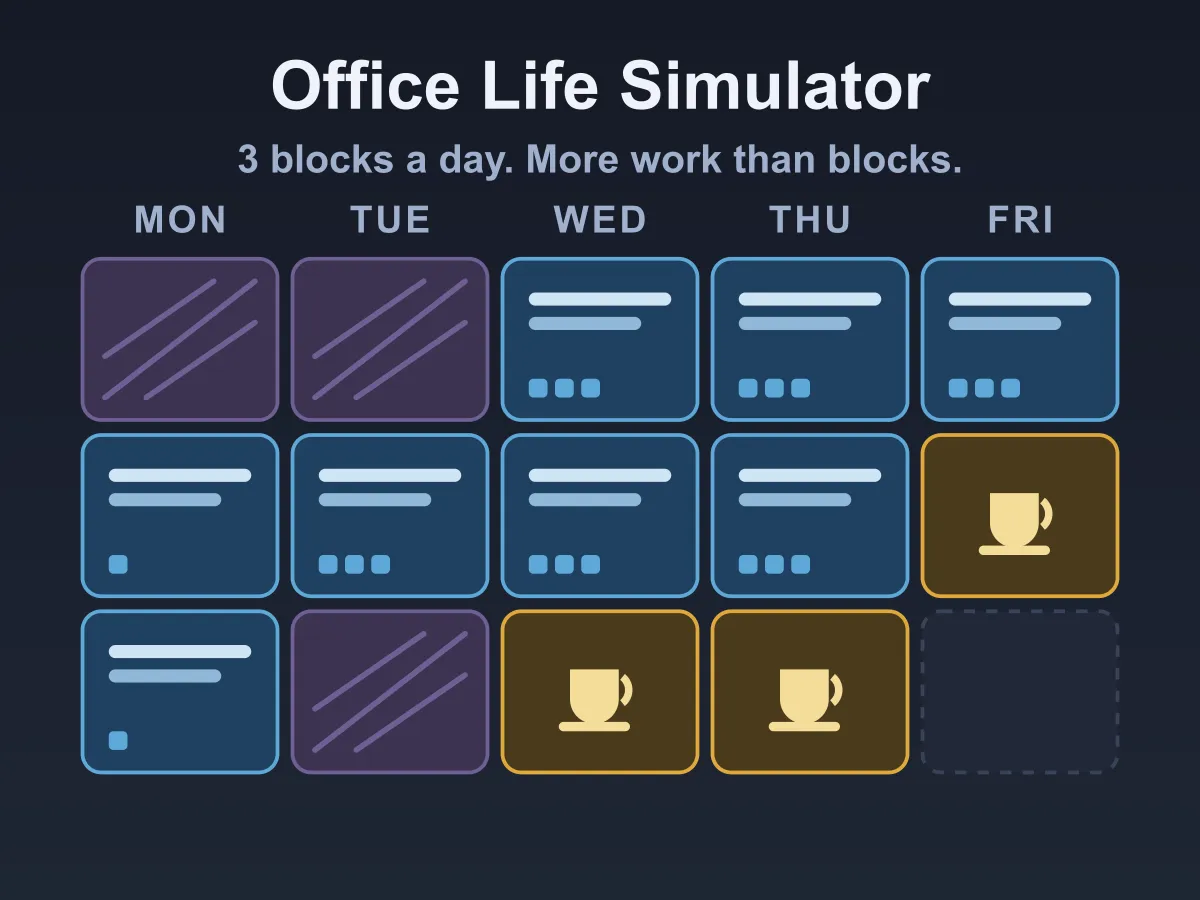
Office Life Simulator is a free online work-week planning game. Monday to Friday, three blocks a day, and meetings already sitting in the diary where you cannot move them. Everything else is yours to arrange: which jobs actually get done, which ones you let slip and take the telling-off for, and when to stop for a coffee. The rule that makes it a game is that the work never fits — every week ships with more demand than there are free blocks, so there is no schedule that does everything and the only question is what to drop. Part-finished work is worth nothing and late work is worth nothing, so spreading yourself across everything is the losing move. Energy runs down as you work, and below the line every block earns less and costs more, which is what turns a coffee break from wasted time into the difference between four good blocks and six bad ones. The week updates as you build it, so you can see what your plan scores before you commit to it. Six weeks, from a quiet first week to one with eleven jobs and five meetings. No download, no account.
How to play Office Life Simulator
- The week is five days of three blocks: morning, midday and afternoon.
- Hatched blocks are meetings. They are already in the diary and cannot be moved or skipped.
- Pick a job from the inbox on the left, then click a free block to book it in.
- On a keyboard: the number keys 1 to 9 pick a job, C picks the coffee break, the arrows move between blocks, Enter books the block under the cursor and Backspace empties it.
- A job takes one, two or three blocks, shown as pips on its card, and they do not have to be next to each other.
- A job only pays if every one of its blocks is done and the last one lands on or before its due day. Half-finished work is worth nothing at all.
- A job you never finish costs you its penalty, which is smaller than its value — dropping something is a choice with a cost, not a disaster.
- Clicking a block that already has something in it empties it and picks that job back up, so moving a job is two clicks.
- Coffee break is in the inbox with the jobs. It costs a block and gets 28 energy back.
- Energy starts at 100 and every worked block takes some. Below 35 you are tired: blocks earn a little over half as much and drain more.
- If energy hits zero the week ends there and everything after it is lost.
- The chips at the top update as you plan: the points your week is on track for, the target, and the energy you would end on.
- Press Finish the week when the plan is how you want it. Clearing the target unlocks the next week.
- New Week generates a different week on the same level; Clear empties the plan without touching the diary.
Tips
- Read the deadlines before the values. A job due Monday can only go in three blocks, so it decides the shape of the week whether you do it or not.
- Work out points per block, not points. A 21-point job that takes three blocks is worth less than two 12-point jobs that take one each.
- Never leave a job part-booked at the end of planning. Those blocks earned nothing — move them onto something you can actually finish.
- Put the coffee in before the tired blocks, not after. Energy spent is spent; the break only helps the blocks that come after it.
- Meetings drain energy too, and a day with two of them is a day you will be working tired unless you plan around it.
- The penalty for dropping a job is a quarter of its value, so on a busy week deliberately abandoning the three-block monster is often the right move.
- The score chip is live. Try an arrangement, read the number, try another — the week is meant to be rearranged, not solved in one pass.
- On the later weeks most of the work cannot fit by design. Stop trying to fit it and start picking the best two-thirds.
FAQ
Is Office Life Simulator free to play?
Yes. It runs in the browser with no download, no sign-up and nothing to buy. All six weeks are included and unlock as you clear them.
Can I get everything done in a week?
No, and that is deliberate. Every week is generated with more blocks of work than there are free blocks once the meetings have taken theirs, and a week that comes out otherwise is thrown away and rebuilt. The gap grows from one block on the first week to at least ten on the last. A week you can simply fill in would be a form, not a game.
What happens if I only half-finish a job?
It pays nothing and you still take the penalty for missing it. The same is true of a job you finish after its due day. That is the rule that makes spreading yourself thin the losing move: four finished jobs beat seven started ones.
Is a coffee break really worth a whole block?
Often, yes. Below 35 energy a block earns a little over half what it would fresh and drains about 60% more, so a break bought at the right moment buys back more than the block it cost. It is measured rather than claimed: the tests run two planners over thirty weeks of every level, one that rests and one that never does, and the resting one scores more on every level. The margin shrinks as the weeks fill up — about 15% on the first week, about 1% on the last, where there is barely a spare block to put a break in.
Can I move a meeting?
No. Meetings are the fixed part of the week — they take their block whatever you write in it and drain energy on top. Everything else is yours to arrange.
Does it tell me my score before I commit?
Yes. The chips at the top show what the plan on the board is on track for, including the energy you would end the week on and where you would burn out. The preview is the same calculation the result uses, so it cannot mislead you.
How many weeks are there?
Six, from six jobs and two meetings to eleven jobs and five meetings. The target is a share of everything on the table rather than a fixed number of points, and that share shrinks each week — a smaller slice of a bigger pile.
Is this about a real workplace?
No. Every job, meeting and deadline in it is invented, and the humour is in the job titles rather than in any particular office.
Does it work on a phone?
Yes. On a narrow screen the inbox sits above the week instead of beside it, both panels scroll on their own, and everything is tap targets — there is nothing to drag.