










Home / Simulation / Fix & Restore
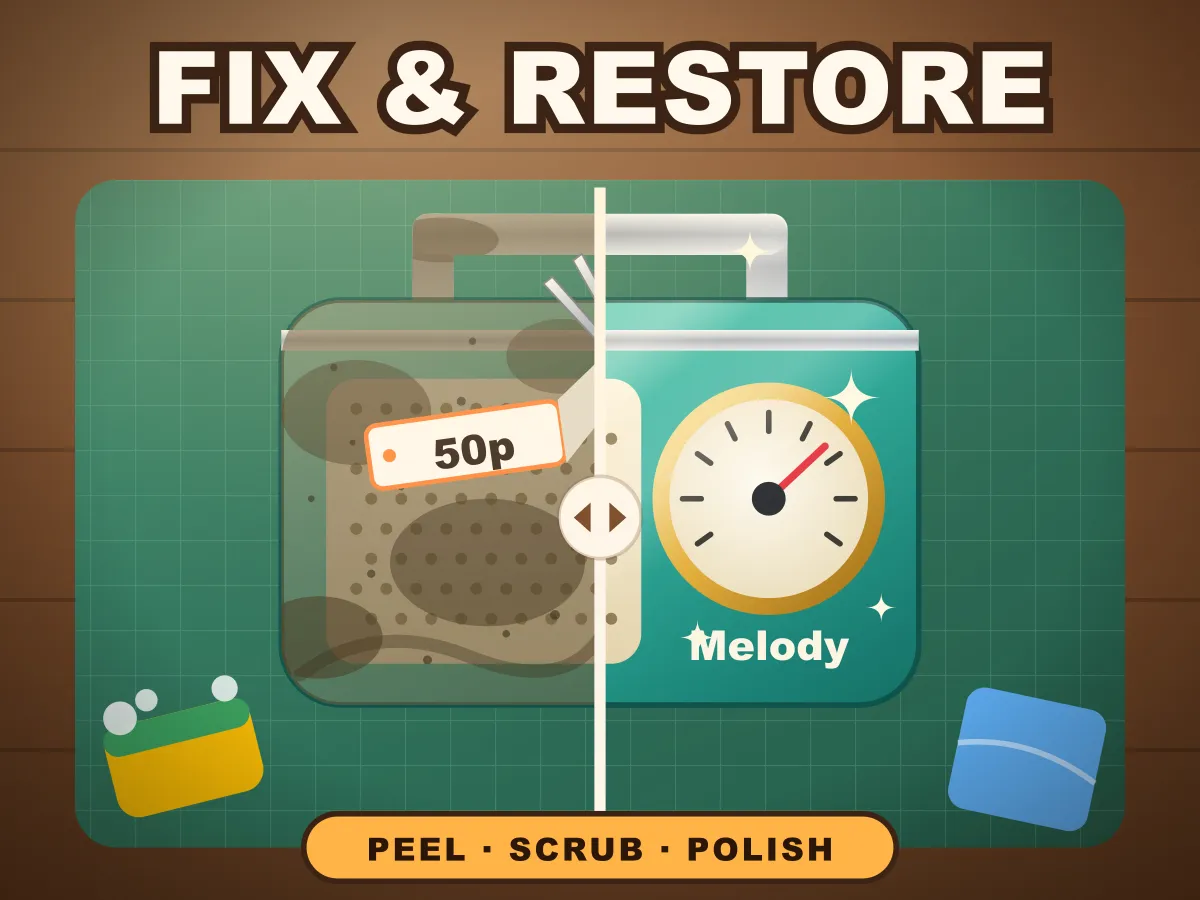
Fix & Restore is a free restore game you play online, right in the browser. Every object on the shelf comes to your workbench faded, grimy and covered in old stickers: a game cartridge, a film camera, a tin robot, a rotary phone, an alarm clock, a skateboard deck, a transistor radio, a sneaker, an enamel teapot and a boombox. You fix each one in three different jobs. Peel the stickers by pulling them slowly along their length, because a yanked sticker tears or leaves sticky glue behind. Scrub the grime with small circles — the sponge only cleans while it moves, and dark baked-on crust takes three times the rubbing. Then polish with slow, even sweeps until every bit shines. Hand it back and the bench shows the object before and after, side by side. Score comes from how much you restored and how fast; pass an object to unlock the next. No download, no sign-up, and it plays with a finger on a phone as well as with a mouse.
How to play Fix & Restore
- Pick an object on the Restoration Shelf. Only the Game Cartridge is open at first; passing an object unlocks the next one along, ten in all.
- Every job has three steps, shown at the top of the screen: Peel, Scrub and Polish. Each step uses a different tool and a different movement, and the meter on the side shows how far the current step has got.
- Peel: press on a sticker and pull along its length, away from the end you grabbed. It comes off as far as you pull. The line at the peel edge shows your speed — green lifts it clean, yellow leaves sticky glue on what it uncovers, and red means it is about to tear.
- If a sticker tears, the rest of it stays stuck and leaves a line of glue where it ripped. Press on what is left and pull it off again, gently this time.
- Scrub: rub the sponge over the dirt. It is the rubbing that cleans, not the pressing — a sponge held still removes nothing, so move in small circles over each grubby patch until it comes clean.
- The darker, crusty patches are baked-on dirt and need about three times as much scrubbing as ordinary grime. Glue left by a fast peel is sticky too, and takes longer than plain dust.
- Polish: sweep the cloth across the object. Here it is time under the cloth that counts, so a slow, even sweep makes everything it passes shine in one go, while a quick swipe leaves thin, streaky polish that needs another pass.
- Once a step is 90% done, small rings mark the last dirty or dull spots so you are not hunting for them.
- Press Next to move to the next step whenever you like, and Finish on the polish step to hand the object back. Anything left undone counts against you. If you try to leave a step that is less than 60% done, or finish below the pass mark, the button asks you to confirm first.
- The object needs to be at least 85% restored to pass. Below that the customer will not take it, and Try again gives you the same dirt back for another go.
- After you hand it back, the bench shows the object before and after with a dividing line you can drag across it. Restore again brings a fresh layout of dirt on the same object.
Tips
- Peel slowly. On every object the bot that yanked its stickers finished later overall than the one that pulled them gently — the tears cost a fresh grab and the glue costs extra scrubbing, which is more than the quick pull saves.
- Grab a sticker near one end. You can press anywhere on it, but the end nearest your finger is the one that lifts, and pulling from an end gives you its whole length in one smooth stroke.
- Scrub in small, tight circles rather than long swipes. A long stroke spreads the same rubbing thinly over a wide strip; a circle keeps it all on one patch, which clears that patch far sooner.
- Leave the dark crust until last in a patch, and give it a few extra circles. It is the same scrubbing, just three times as much of it, so do not move on the moment the brown film around it lifts.
- Polish in slow rows that overlap a little, like mowing a lawn. Going back over a streaky row costs more time than doing it slowly once.
- Watch the rings that appear at 90%. They mark exactly what is left, so finish those and the meter tops out.
- Three stars needs 99% restored and the time inside par, which is shown under the meter. If you are well inside par, take a moment to clean up the last spots — the restored percentage is worth more than the time bonus.
- Do not hand back early just to stop the clock. The time bonus is at most 300 points, while every percentage point restored is worth 10, and anything under 85% does not pass at all.
FAQ
Is Fix & Restore free to play?
Yes. It runs in your browser with no download, no account and nothing to buy. All ten objects are included and unlock one after another as you pass them.
Can I play Fix & Restore on my phone?
Yes. Every step is done with a finger — press and pull to peel, rub to scrub, sweep to polish — and the game lays itself out upright on a phone, with the object zoomed to fill the screen. It plays with a mouse on a computer too.
How do I peel a sticker without tearing it?
Press on the sticker and pull steadily along its length. The coloured line at the peel edge shows your speed: green lifts it cleanly, yellow leaves glue on the surface it uncovers, and red is the speed at which it tears. A torn sticker stays partly stuck, so you have to grab what is left and pull again.
Why does the sponge not clean when I hold it still?
Because scrubbing is about movement: the sponge removes grime in proportion to how far it travels over it. Rubbing small circles keeps that travel on one patch, which is why it works so well. Very fast frantic rubbing does not help either — beyond a brisk pace, extra speed cleans nothing more.
What are the dark crusty patches?
Baked-on dirt — dried mud on the sneaker, limescale on the teapot, rust freckles on the tin robot. It needs about three times as much scrubbing as ordinary grime. Glue left behind by a quick peel is also sticky and takes longer than plain dust.
How is my score worked out?
Up to 1,000 points for how much of the object you restored — a spot counts in full once it is uncovered, clean and polished, and part-done spots count in part — plus a time bonus of up to 300 points. You get the full bonus at or under the par time, and it shrinks to nothing at twice par. An object has to be at least 85% restored to pass.
How do I get three stars?
Restore the object to at least 99% and finish inside its par time. Two stars needs 95% restored at any speed, and one star is a pass at 85%. Each par time is set by a bot that cleans every object thoroughly, with twice its time allowed, because a person has to look for the dirt and the bot does not.
Is it quicker to rip the stickers off fast?
No. We measured it: on all ten objects, a bot that yanked its stickers finished later overall than one that peeled them slowly. Yanked stickers tear and need a second grab, and the glue they leave behind adds scrubbing.
Can I fail a job?
There is no countdown, so you can never run out of time — but if you hand an object back less than 85% restored, the customer will not take it. Try again gives you exactly the same dirt and stickers for another go.
Is it the same object every time?
The ten objects are always the same, but the dirt is not. Try again repeats the same layout so you can improve on it, and Restore again on a finished object gives it a fresh layout of grime and crust.
How is this different from Power Wash?
Power Wash is one action — spraying — over a big surface. Fix & Restore puts three different jobs on one small object, each with its own tool and its own movement: a careful pull for stickers, rubbing for grime, slow sweeps for polish. And every job ends with a before-and-after view of the object you brought back.
Is my progress saved?
Yes, in your browser. The game remembers which objects are unlocked and your best score and stars on each, so you can come back and go for three stars later.