








Home / Creative / Zen City Builder
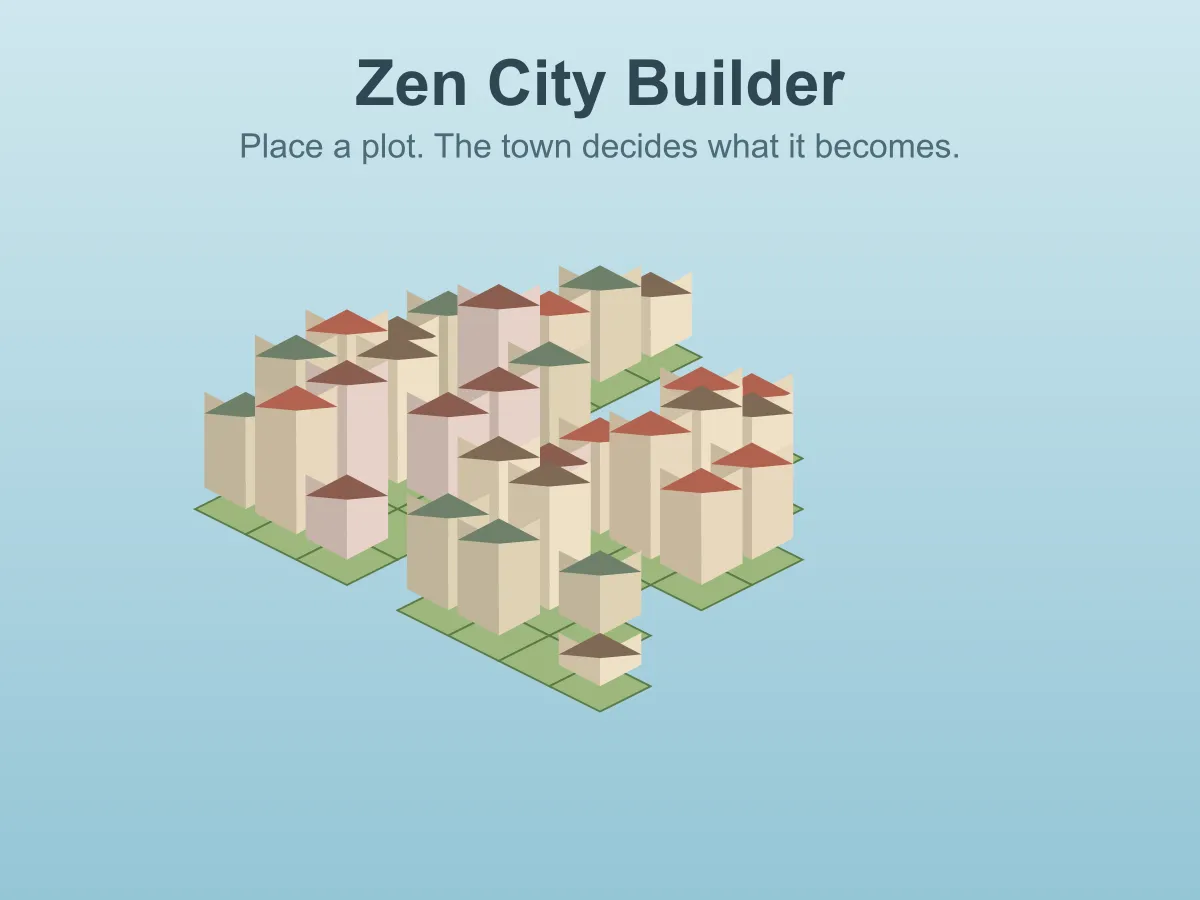
Zen City Builder is a free, relaxing 3D city building game you play in the browser, with nothing to lose. There is no money, no timer and no failure state — there is an island in a calm sea, there are plots of land, and tapping a plot builds on it. What stands there is not your choice: the town decides from the neighbours. A plot on its own becomes a one-storey cottage that turns its ridge towards the nearest house, two side by side become a terrace under one long roof, a corner plot turns its gable to face the street, and a plot hemmed in on all four sides can rise into a tower above the rooftops. Clear one and every building around it rebuilds itself around the gap, so a town is never a list of decisions — it is the shape those decisions add up to. Houses facing open water grow a jetty with a lamp and a little boat, roofs take their colours from a palette each island draws for itself, and every tap plays a soft note in that island’s own key, so building a street sounds like a tune being written. Drag to turn the island, zoom in on a harbour, and save a picture of any town you like the look of. Six islands, from a 27-plot headland to an 89-plot scattered archipelago, and an island is finished when every plot has something standing on it. Your towns are kept in the browser, so you can come back and carry on. No download, no account.
How to play Zen City Builder
- Press Play, then click or press any key on the title screen and pick one of the six islands.
- Tap an empty plot to build on it. Tap a building to clear its plot again.
- You never pick the building. The town works out what grows from the plots next to it.
- A plot with no built neighbours becomes a one-storey cottage, its roof ridge turned towards the nearest house.
- Plots side by side join into a terrace under one long ridge; two at a right angle make a corner house that faces the street.
- A plot built on all four sides can rise into a tower, one or two storeys clear of the roofs around it — towers never stand right next to each other.
- Clearing a plot rebuilds every building around it, so a terrace splits back into cottages the moment you take its middle away.
- Any house looking out over open water gets a jetty with a lamp and a boat.
- Drag (or Q / E and the arrow keys) to turn the island, and use the mouse wheel or a two-finger pinch to zoom.
- P or the Save picture button keeps a PNG of the town; Esc or Islands goes back to the island list. An island is finished when every plot has something on it.
Tips
- Build a long straight run before filling anything in. Terraces only form along a line, and a row of five reads completely differently from five cottages.
- Towers need all four sides built, so they only grow inland — a coastal plot can never become one.
- Leave the centre of a block empty and the ring around it stays low terraces; fill it last and watch the middle rise above the roofs.
- For a skyline, build the middle of the island first and work outwards. For a fishing village, build along the shore and let the jetties line up.
- Clearing one plot is the quickest way to change four buildings at once, which makes it more of a tool than an undo.
- Turn the island before you tap: a plot hidden behind a roof is easier to reach from the other side.
- Tap at an easy pace. Each tap plays the next note of a little melody in the island’s key, and quick taps run up the scale.
- There is no score and nothing to optimise. If a town looks right half full, that is a finished town — save a picture of it.
FAQ
Is Zen City Builder free to play?
Yes. It runs in the browser with no download, no sign-up and nothing to buy, and all six islands are open from the start.
Can I lose?
No. There is no timer, no money, no population to keep happy and no failure state of any kind. The only ending is an island with something on every plot, and even then you can keep rearranging it.
Why can I not choose which building to place?
Because that is the game. You choose where, and the shape of the town decides what: a plot alone is a cottage, a line of them is a terrace, a corner faces the street and a plot surrounded on all four sides can become a tower. Every building is worked out again from its neighbours whenever anything changes, so the town always fits together.
What happens if I clear a plot in the middle of a row?
The row stops being a row. The buildings either side of the gap lose a neighbour and rebuild — a terrace becomes two shorter ones or a pair of cottages, and a tower next to the gap sinks back to the roofline.
Is it a 3D game?
Yes. The islands, houses, jetties, boats, trees and sea are all drawn in real time with WebGL, and you can turn the island all the way round, tilt the view and zoom in to street level. It needs no plugin.
Is my town saved?
Yes. Every island’s town is kept in your browser, so you can close the page and carry on later. The restart button asks before it clears anything, and then clears only the island you are on. To keep a town for good, save a picture of it.
How many islands are there?
Six: The Headland (27 plots), Quiet Cove, Twin Isles, Long Spit, Lagoon Ring and the Scattered Archipelago (89 plots across six islets). Bigger, more broken-up islands have more coastline, so more jetties and fewer towers.
Does it work on a phone or tablet?
Yes. Tap to build, drag with one finger to turn the island and pinch to zoom; the Islands and Save picture buttons stand in for the keyboard. The page will not scroll under your finger while you build.
How is this different from the block building game here?
Voxel Craft Builder is exactly the blocks you stack, one at a time. This is the opposite: you place a plot and the town decides what goes on it. There are no blocks to pick, no height to choose and no blueprint to match.