







Home / Creative / DJ Mix Studio
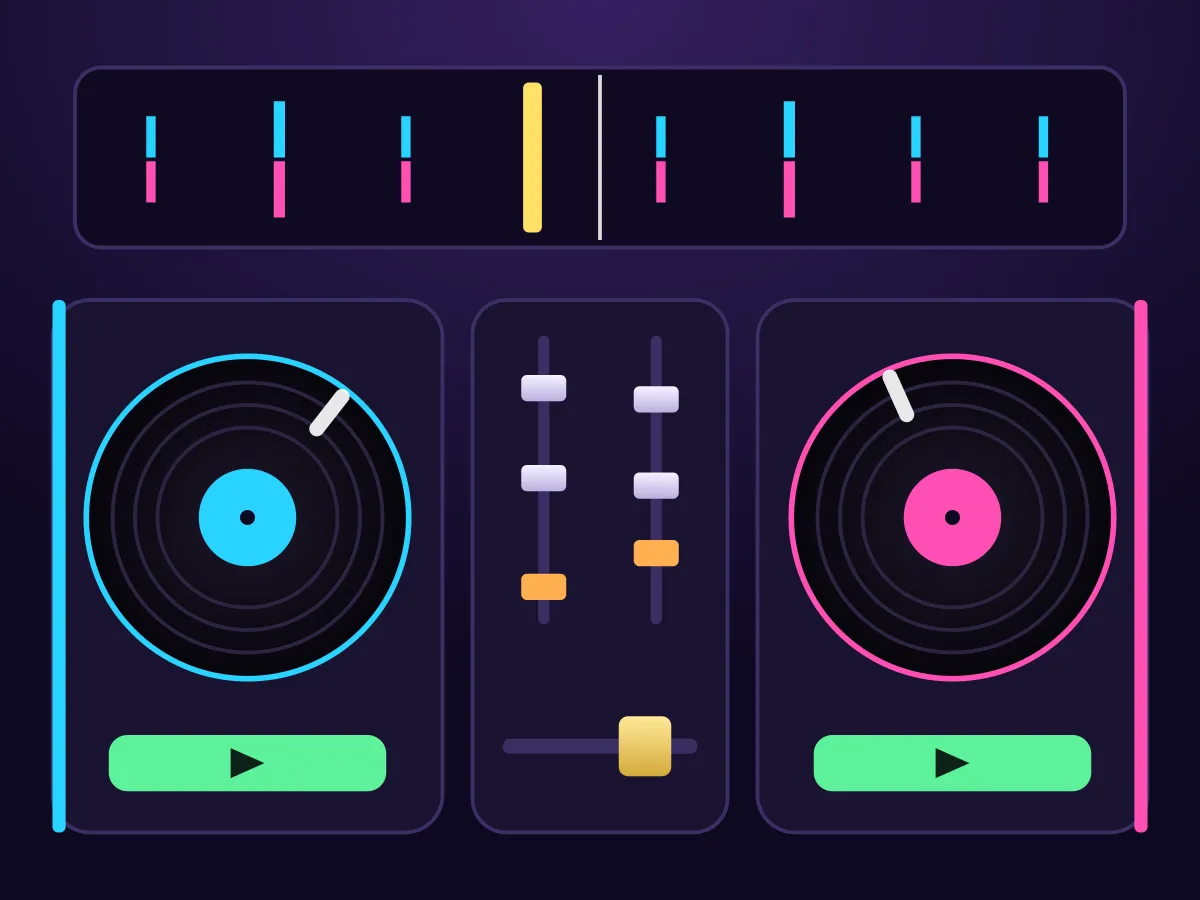
DJ Mix Studio is a free online DJ mixer game about the one skill every DJ learns first: the blend. Two decks each play a track made in your browser, the next one at a different tempo. Pull its pitch fader until the tempos match, start it on the outgoing track’s phrase line, keep the two beat grids together with nudges while it runs silent, then slide the crossfader across — and swap the basslines on the EQ so two never play at once. Eight missions take you from a shared tempo with a Sync button to hidden tempos you match by watching the grids drift, and a three-track set to finish. Each mix is scored on how close the beats stayed, whether it came in on the phrase and how long the basslines clashed. There is a free mix mode with no score, and it plays with the sound off too, because the beat grids show everything you would hear. No download, no account.
How to play DJ Mix Studio
- Press Start mission. Deck A starts playing two phrases before its outro; deck B is cued at its first beat.
- Match the tempo: move B’s pitch fader until its BPM reads the same as A’s (on the first two missions, press Sync to do it for you).
- Start B on one of A’s phrase lines — the line above the tracks counts the beats to go. It runs silent while the crossfader is over on A.
- Watch the beat grids in the middle of the screen: B’s beats should sit right under A’s. If they drift apart, hold Slow or Fast on deck B to nudge it back.
- When A reaches its outro (the gold MIX line), slide the crossfader towards B. Both tracks are now on air together.
- From the fourth mission both tracks keep their bassline. Pull B’s LOW down before it comes in, then swap: bring B’s low back up and take A’s low out.
- Finish by sliding the crossfader all the way to B. The mix is scored on the beat gap while both were on air, the phrase you came in on, and any time with two basslines.
- On a keyboard: Q, W play and cue deck A, A/S nudge it, Z/X move its pitch and D kills its bass; P, O, K/L, N/M and J do the same for B, and ← → move the crossfader.
Tips
- Start the incoming track a whole phrase early with the crossfader on the other deck. It plays silently, and that phrase is your time to nudge the beats together before anyone hears it.
- Nudge in short holds. Holding Fast for half a second moves B about twenty milliseconds at these tempos; a long hold overshoots.
- If the gap keeps coming back in the same direction after every nudge, the tempos are not matched. Fix the pitch fader instead of nudging again.
- On the hidden-tempo missions, watch how fast the grids drift: a gap that grows quickly means a big pitch correction, a slow creep means one or two notches.
- Bring the new track in on its first beat at the start of the outgoing track’s phrase. One beat early or late throws the whole phrase off, even when every beat lines up.
- Swap the bass on a phrase line and do both knobs close together. Every beat with both lows up counts against you; a gap with neither low up does not.
- Cue sends a deck back to its first beat, stopped. If you started B on the wrong beat, cue it and start it again on the next phrase line.
FAQ
Is DJ Mix Studio free?
Yes. It plays in your browser with no download, no account and nothing to buy. Every track is made in the browser as it plays, so nothing is loaded either.
What is beatmatching?
Playing two tracks at exactly the same tempo with their beats landing together, so you can overlap them without the drums stumbling. In DJ Mix Studio you match the tempo with the pitch fader and line the beats up by starting the track on a phrase line and nudging it — the beat grids in the middle of the screen show how far apart the two decks are, to the millisecond.
What does mixing on the phrase mean?
Dance tracks move in phrases of sixteen beats. Bringing the next track in at the start of one of the outgoing track’s phrases keeps their sections changing together; coming in a beat or two off means the new track’s intro ends in the middle of the old track’s phrase. The game shows phrase lines in gold and scores how far off one you came in.
Why do I have to turn the bass down?
Two basslines playing at once clash and muddy the mix. From the fourth mission both tracks keep their bass right to the ends, so you keep the incoming track’s LOW down as it comes in and swap the two lows over during the blend. Every beat with both basslines up costs points.
Can I just press Sync?
On the first two missions and in free mix, yes — Sync matches the tempo, though you still have to line the beats up yourself. From the third mission there is no Sync, and from the sixth the incoming track’s tempo is hidden, so you match it by watching how fast the beat grids drift apart.
How are the stars decided?
Each mission’s three star scores sit between test DJs of different skill who play it through the same game: a careful one, a steady one, a beginner and one who ignores the tempo. They are checked on sets of tracks they were not set on. From the second mission on, a mix that never matches the tempo earns a star in at most one set in seven — and cutting across in a beat or two does not get round it, because a blend closed short of the mission’s length is judged as if both tracks had played on for the beats it skipped.
Can I play with the sound off?
Yes. The score comes from the decks’ beat positions, not from listening, and the beat grids, phrase lines and bass markers show everything you would hear. It is easier with sound — a clash is obvious by ear — but nothing depends on it.
Is there a mode without a score?
Free mix gives you both decks with Sync and printed tempos, and a Load button on each deck for a new track. There is no brief and no end: mix for as long as you like.
Does DJ Mix Studio work on a phone?
Yes. Held upright, the tracks sit on top and the two decks side by side above the mixer; every fader is a drag and the nudge buttons work as long as you hold them. It also works on a phone held sideways, and with a keyboard the transport, pitch, nudges, bass kill, Sync, loop and crossfader have their own keys, while every other knob and fader can be reached with Tab and moved with the arrow keys.