





Home / Puzzle / Pixel Clue Fill
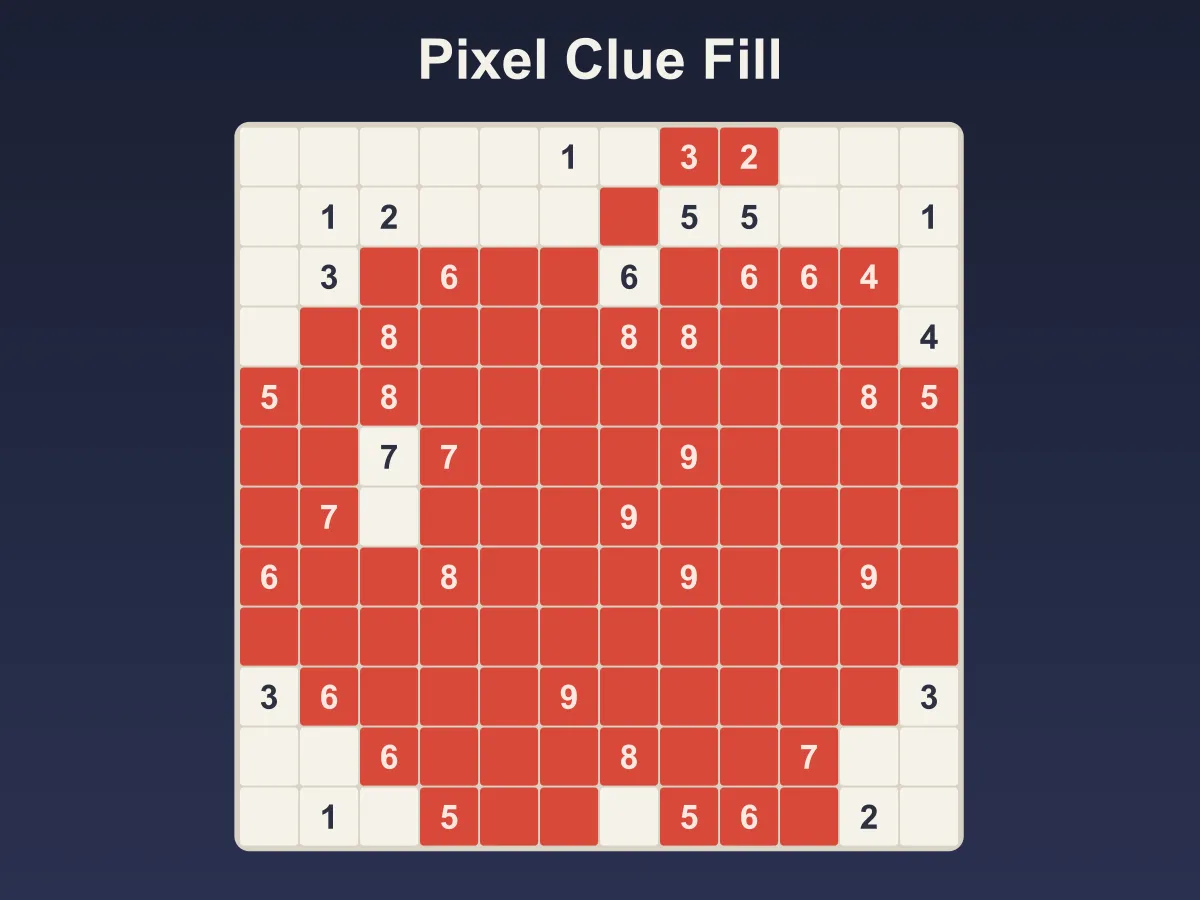
Pixel Clue Fill is a free online picture logic puzzle of the kind also sold as Fill-a-Pix or Mosaic — if you came looking for a fill a pix puzzle online, this is that game under a name of its own. A square grid hides a pixel picture. Some squares carry a number from 0 to 9, and that number is how many squares are shaded in the 3×3 block centred on it, counting the numbered square itself. A 9 shades its whole block, a 0 leaves its whole block blank, and everything in between is worked out from the numbers that overlap. Tap a square to shade it, tap again to mark it blank, and drag to paint a whole run at once; on a computer the right mouse button marks blank directly. A number turns red the moment its block holds too much shading, or can no longer hold enough. Solve the board and the picture takes its colour — a heart, an anchor, a sailboat, an owl, a snowflake and 21 more hand-drawn pictures across eight levels, from 8×8 to 15×15. Every board has exactly one answer and is proved solvable without guessing before you see it; the later levels need a "what if" followed through to a contradiction. No download, no account.
How to play Pixel Clue Fill
- Each number counts the shaded squares in the 3×3 block centred on it — the numbered square itself and the up to eight around it.
- On the edge of the grid a block is smaller: a corner number looks at four squares, an edge number at six.
- Tap a square once to shade it, again to mark it blank, and a third time to clear it.
- Press on a square and drag: every square you cross that looked like the first one gets the same change, so one stroke shades a run of undecided squares — and never paints over squares you already marked differently.
- With a mouse, the right button marks a square blank straight away.
- A number turns red when its block already holds more shading than it asks for, or has too few undecided squares left to reach it.
- A number fades once its block is fully decided and correct, so you can stop looking at it.
- On a keyboard, arrow keys move between squares, F shades, X or . marks blank, Backspace clears, and Space or Enter cycles the square.
- The picture is solved when exactly the right squares are shaded. Blank marks are for your own notes and are never required.
- The ? button decides one square: it corrects a wrong mark first, and otherwise makes the next deduction the numbers allow. Three per picture.
- Undo steps back one change, Clear wipes the board, and New Picture brings a different picture on the same level.
Tips
- Start with the 0s and the 9s. A 0 blanks its whole block and a 9 shades it, and the squares they decide feed every number beside them.
- A number in a corner can only reach four squares, so a corner 4 shades all of them. On an edge, a 6 shades all six.
- Once a number has all its shading, mark the rest of its block blank at once — those blanks are what unlock the next number.
- Look at two numbers side by side. A 7 next to a 4 shares six squares with it, and those six can hold at most 4 — so the 7's own three squares are all shaded, the shared six hold exactly 4, and the 4's own three squares are all blank.
- Numbers that sit two apart share a strip of three squares. Whatever that strip holds counts for both, so the parts only one of them sees are often forced.
- When nothing is forced, pick a square and ask what would happen if it were shaded. If that makes some number impossible, it is blank.
- Big blank margins are common: a picture rarely touches every edge, so a run of low numbers along the border usually means a row of blanks.
FAQ
Is Pixel Clue Fill free to play?
Yes. It runs in the browser with no download, no sign-up and nothing to buy. All eight levels are included and unlock as you solve them.
Is this the same as Fill-a-Pix?
It is the same kind of puzzle — numbers that count the shaded squares in their 3×3 block, and a picture that appears when you get them all right. Fill-a-Pix is the name Conceptis uses for its own puzzles; Pixel Clue Fill is an independent game and is not affiliated with Conceptis. The puzzle is also printed as Mosaic, and every picture here was drawn for this site.
Does the number count its own square?
Yes. Each number looks at the 3×3 block centred on it, so it counts itself plus the up to eight squares around it. That is why a 9 is possible, and why a numbered square can be shaded.
Does every puzzle have exactly one answer?
Yes, and it is checked rather than assumed. Each board starts from a hand-drawn picture with a number on every square, and numbers are only taken away while a program that makes nothing but forced moves can still finish it. A board it finishes that way has only one answer, and the tests confirm it with an exhaustive search as well.
Will I ever have to guess?
No. On the first four levels every square follows from one number or from two overlapping numbers read together. Level 5 and the last two levels also need at least one "what if": suppose a square is shaded, follow the numbers, and find one that can no longer be met.
How many pictures and levels are there?
Twenty-six hand-drawn pictures across eight levels, from an 8×8 grid to a 15×15. Each level has at least three pictures, and New Picture walks through them in turn, each with its own set of numbers.
Why has a number turned red?
Its 3×3 block already holds more shaded squares than the number, or so many of its squares are marked blank that it can no longer reach the number. A number whose block is simply unfinished is never marked, because an unfinished board is not a mistake.
Do I have to mark the blank squares?
No. Blank marks are notes for yourself. The picture counts as solved as soon as exactly the right squares are shaded, whether or not the rest are marked.
Does it work on a phone?
Yes. Tapping is the whole input, dragging to paint works with a finger, and on a phone held upright the frame grows taller so even the 15×15 boards keep squares big enough to tap.