







Home / Simulation / Train Driver
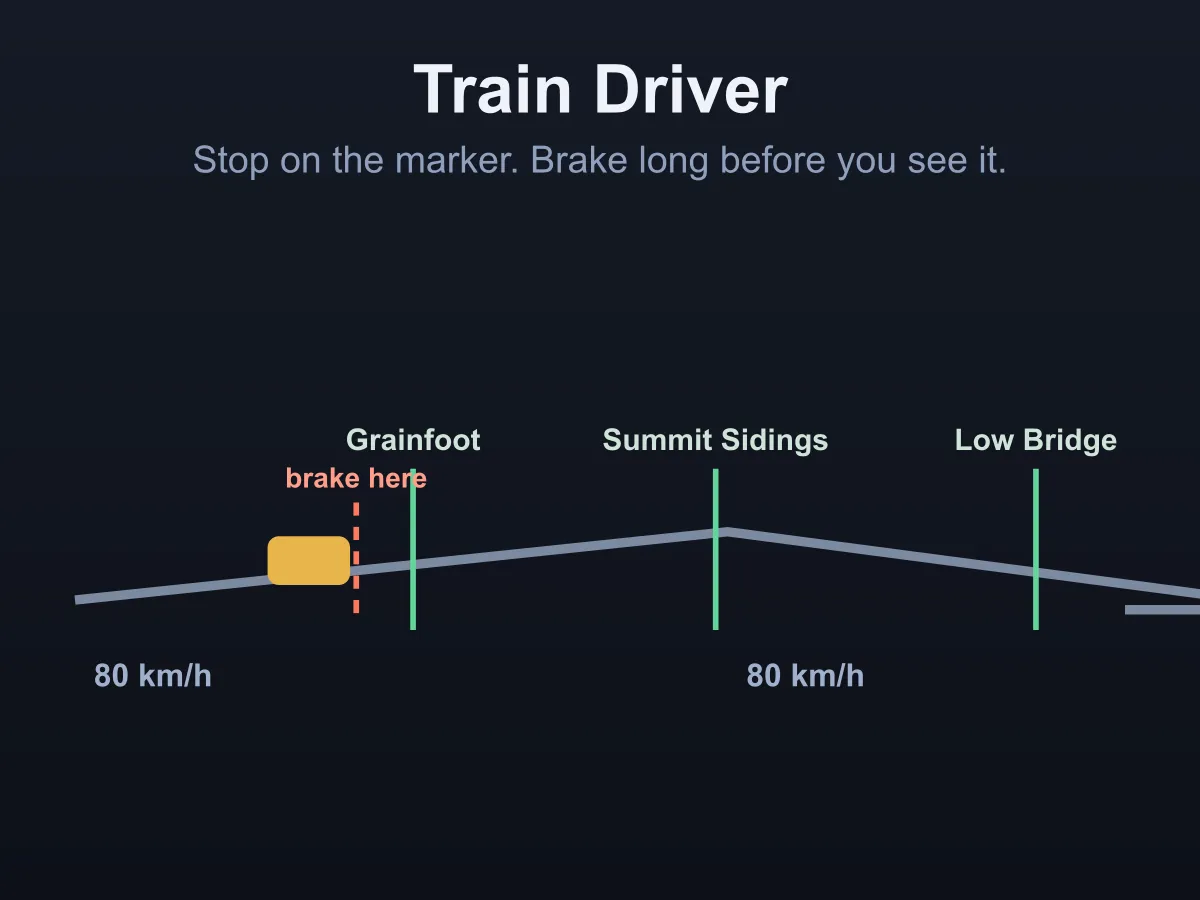
Train Driver is a free online train driving game about the one thing a train cannot do: stop quickly. You have a power handle, a brake, and a line with gradients, speed restrictions and stations that each have a marker your front cab has to come to a stand on. Everything else follows from momentum. Brake where the physics says and the stop lands on the marker; brake when the platform comes into sight and you are already through it. Three things pull against each other and a driver has to trade them: stopping accurately, keeping the timetable, and never exceeding the line speed — braking early is safe and makes you late, running to the limit is punctual and overshoots, and a gradient quietly changes both. The cab shows your speed, the limit, the gradient under the train and the distance to the marker, along with the point at which the brakes have to go on. Knowing that number is not the skill; using it while the line falls away under you is. Six runs, from a two-stop branch line to a five-stop main line with a 2.1% climb and a 50 km/h restriction. No download, no account.
How to play Train Driver
- The lever has three power notches, a coast position and three brake steps. Press one, or use the up and down arrow keys.
- Power accelerates, coast lets the train roll, and the brake slows it. Nothing stops instantly.
- Each station has a marker, and the front of the train has to come to a stand within a few metres of it.
- The approach strip shows where the train is, where the marker is and where the brakes have to go on. When that braking mark turns red it is already behind you.
- Gradients change everything: uphill holds the train back and shortens the stop, downhill does the opposite. The cab shows the gradient under you.
- Speed restrictions apply from the board onwards, so you have to be down to the new limit before you reach it, not after.
- Seconds spent above the line speed are counted, and a run only forgives a few.
- Every station has a booked time. Arriving early costs nothing; arriving late is counted across the whole run.
- Creeping the last few metres is a perfectly good way to land the stop — it just uses time you may not have.
- Press B for full brake and 0 to coast, which are the two you want in a hurry.
- The run is signed off when the last station is called and the doors shut. Run through a platform and it is reported instead.
Tips
- Start braking on the number, not on the platform. At 80 km/h on the middle brake step the train needs about 215 metres, which is further than you can see the platform from.
- Watch the braking mark rather than the distance. It moves towards you as you speed up, and that is the warning.
- Ease the brake off as the speed falls. Full brake all the way in stops the train short of the marker.
- On a falling gradient put the brake on earlier and harder — the hill is pushing, and the stopping figure in the cab already accounts for it.
- Come down to a restriction before the board, not on it, or the seconds start counting straight away.
- Coasting is free speed. On a downhill run to a station you often need no power at all between the stops.
- Stopping short is recoverable: the doors only open within fifteen metres of the marker, so a touch of power and an immediate brake will walk the train on without costing much time.
- The later runs are tight enough that the time saved by running to the limit is the difference — but so is one overspeed second, so run three or four under it.
FAQ
Is Train Driver free to play?
Yes. It runs in the browser with no download, no sign-up and nothing to buy. All six runs are included and unlock as you clear them.
How is this different from the other train game here?
Rail Switch Puzzle is about the track: the trains drive themselves and you throw the crossovers. This is the opposite — one train, one line, no switching, and everything that happens comes out of the power handle and the brake.
Why do I keep running past the platform?
Because you are braking when you can see it. A train at 80 km/h needs about 215 metres on the middle brake step — and over 400 on the lightest one — so the braking point is a long way behind the first sight of the station. The approach strip in the cab marks that point; when it turns red, the stop has already gone.
Does the gradient really matter?
Yes, and it is the same physics the stopping figure uses. A 2% fall adds about a fifth to the distance needed from line speed, which is more than the width of a platform — it is the difference between stopping on the marker and stopping past it.
What counts as a good stop?
Within a few metres of the marker, and the allowance tightens from twelve metres on the branch line to eight on the main line. The report at the end averages every stop on the run, so one bad one can be carried by the rest.
Is it better to be early or accurate?
Both, and that is the game. Braking early is the safe way to hit the marker and the reliable way to lose time; running to the limit keeps the timetable and overshoots. The runs are timed so that a driver doing both properly has room, and a driver doing only one does not.
Are the timetables actually keepable?
Yes, and they are measured rather than written. A driver that brakes exactly where the physics says and holds the line speed drives every run in the tests, stopping within about two metres of every marker, and each booked time is that run plus a margin which shrinks from 26 seconds a station to 10.
How many runs are there?
Six: a flat two-stop branch, a three-stop line with a restriction, a climb and a descent, a fast road with a 45 km/h slack, a four-stop switchback, and a five-stop main line. The accuracy, punctuality and overspeed allowances all tighten as they go.
Does it work on a phone?
Yes. The notches become two rows of thumb-sized buttons on a narrow screen, and the approach strip keeps its shape so the braking point is just as readable.